
ZESTECH Wired to Wireless CarPlay Adapter AX1800 Dongle: Full Product Specification
Release time:2026-09-22
ZESTECH officially introduces the Wired to Wireless CarPlay AX1800 Dongle — a compact car adapter that converts your factory wired CarPlay or wired Android Auto into a fully wireless experience. Below is the complete product specification, including PCBA size, hardware block diagram, power requirements, antenna design, user manual and precautions.
1. Product Introduction
This product is a wired to wireless car adapter for CarPlay or Android Auto, also known as a car dongle. It is built on the AX1800 series chip, which integrates a single Cortex-A7 core running at 1000 MHz.
Compatible with 98% of car models on the market that come with wired CarPlay or wired Android Auto;
Simple operation and ease of use — simply plug the adapter into the USB-A or TYPE-C port of the car audio system and follow the on-screen instructions to complete the process.
2. PCBA Size
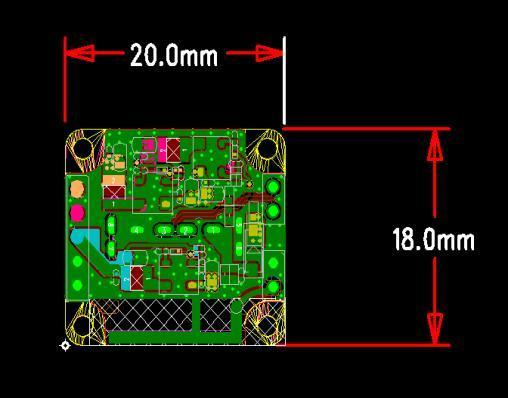
The PCBA measures 20.0 mm × 18.0 mm, making it compact enough to be hidden behind the dashboard or integrated into the center console.
3. Hardware Block Diagram
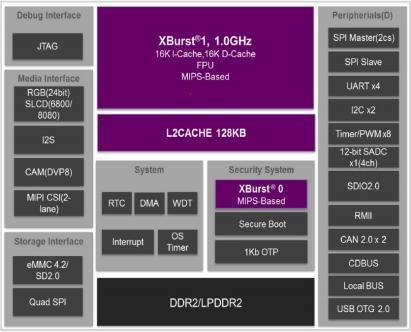
The AX1800 platform integrates an XBurst CPU core (MIPS-based, 1 GHz) with 16K I-Cache / 16K D-Cache and FPU, a 128 KB L2 cache, and DDR2/LPDDR2 memory support. It provides a rich set of interfaces:
Media interfaces: RGB (24bit), S/LI(DVP800/8080), I2S, CAM(DVP8), MIPI CSI (2-lane);
Storage interfaces: eMMC 4.2/5.2, SD 2.0, Quad SPI;
Peripherals: SPI Master (2cs), SPI Slave, UART ×4, I2C ×2, Timer/PWM ×8, 12-bit SACD ×16ch, SDIO 2.0, RMII, CAN 2.0 ×2, CDBUS, Local BUS, USB OTG 2.0;
System & security: RTC, DMA, WDT, Interrupt, OS timer, Secure Boot, 1Kb OTP, plus a JTAG debug interface.
4. Operating Voltage and Current
| Item | Parameter | Test Conditions | Minimum | Typical | Maximum |
|---|---|---|---|---|---|
| 1 | Operating voltage (V) | 25°C | 4.5 | 5 | 5.5 |
| 2 | Operating current (mA) | 25°C | 100 | 200 | 1000 |
5. Antenna Type
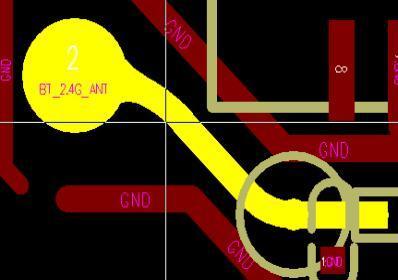
5-1 Bluetooth: Supports BTDM 5.4 with an onboard antenna, operating frequency 2402 MHz – 2480 MHz.
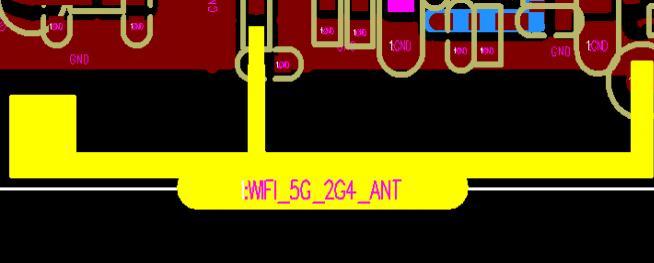
5-2 Wi-Fi 6: Supports Wi-Fi 6 with an onboard antenna, operating at frequencies of 2.400 GHz – 2.497 GHz and 5.150 GHz – 5.850 GHz.
6. Product User Manual
Start the vehicle and wait until the vehicle's infotainment system has finished loading and the screen enters the standby main interface.
Connect the wireless CarPlay/Android Auto adapter to a USB-A or USB-C port in your car. Make sure the adapter is plugged into a wired CarPlay or Android Auto port.
On your iPhone/Android smartphone, turn on Wi-Fi and Bluetooth. Locate the Bluetooth adapter named "smartAdapter_****" (the Bluetooth name can be customized), tap to pair; tap "Allow"; tap "Use CarPlay" or "Use Android Auto".
LED light operating status description:
Cyan status: Power-on indicator light.
Green status: CarPlay connecting (green light flashing quickly); CarPlay connected (green light on continuously).
Blue status: Android connecting (blue light flashing fast); Android connected (blue light solid on).
7. Precautions
The wireless CarPlay/Android Auto adapter works by establishing a pairing between your iPhone/Android smartphone and your vehicle via Bluetooth, then switching to Wi-Fi to maintain a wireless connection. Once Bluetooth pairing is successful, your iPhone/Android smartphone will automatically connect to the adapter's Wi-Fi network, then disconnect from the default CarPlay adapter Bluetooth connection and automatically connect to your car's Bluetooth (Android Auto default).
Please ensure that the power indicator light on the wireless CarPlay Android Auto adapter is on.
Please ensure your vehicle model supports wired CarPlay/Android Auto.
Wireless playback requires an iPhone 6 or later, running iOS 10 or later; for wireless Android Auto, an Android smartphone that supports the latest Android Auto feature with Android 11 or later installed is required.
8. Operating Temperature and Storage Conditions
| Operating temperature | -10°C ~ 70°C |
| Storage conditions | -20°C ~ 80°C |
For more information about the AX1800 wired to wireless CarPlay/Android Auto dongle, please visit www.szzest.com or contact us at info@szzest.com.

Tel: +86 755 2369 9550
Email: info@szzest.com
Add:
Building A, Huada Industrial Park, Fuqiao Third Industrial Zone,
Fuhai Street, Bao 'an District, Shenzhen, Guangdong


Design:jiasuweb