


From Wired to Wireless: Making Any CarPlay Car Wireless-Ready with the ZESTECH AX1800 Adapter
Product Features
-
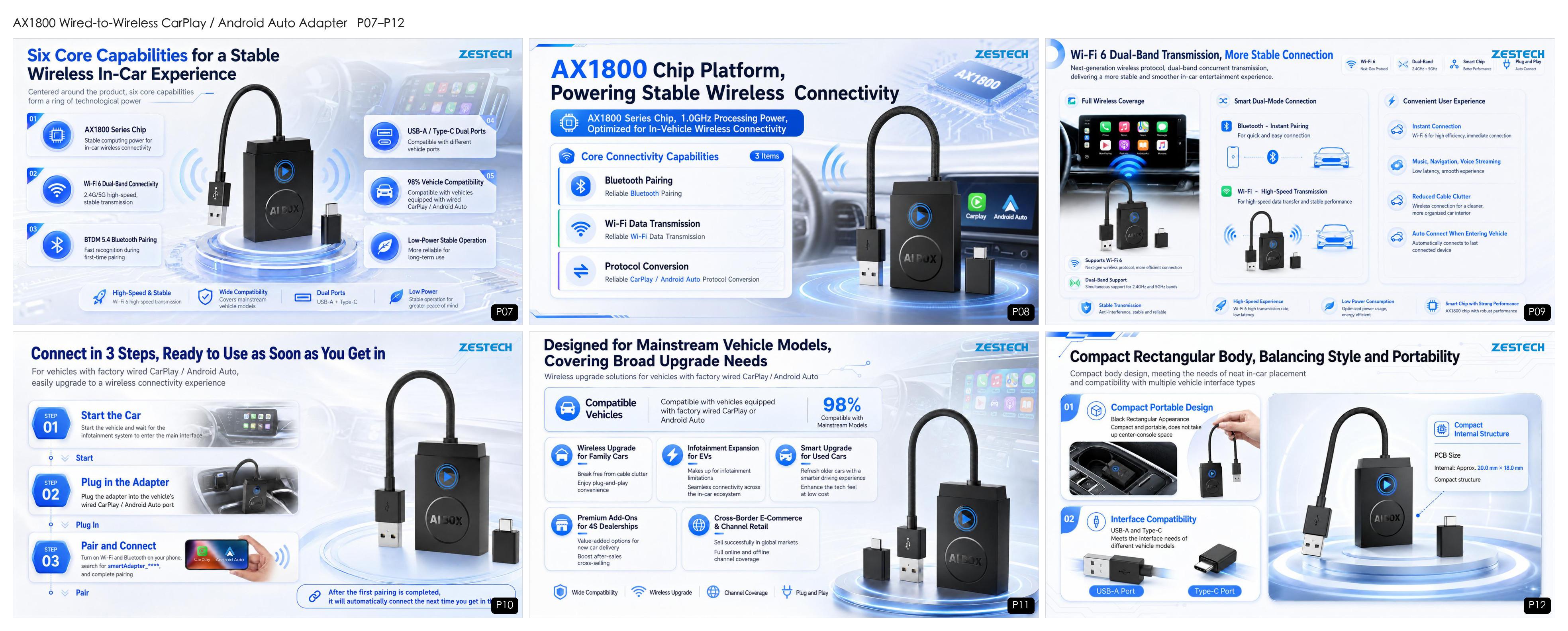
ZESTECH AX1800 wired-to-wireless CarPlay / Android Auto adapter: compatible with 98% of factory-wired cars, Wi-Fi 6 + Bluetooth 5.4, USB-A / Type-C 2-in-1, plug and play, auto-reconnect. OEM customization available.
Product Introduction
ZESTECH AX1800 adapter — wired car in, wireless freedom out
One Adapter, Upgrade Your Car System to Wireless
The AX1800 adapter is designed for the huge group of vehicles that already have wired CarPlay / wired Android Auto from the factory. It is compatible with 98% of car models equipped with a wired CarPlay or Android Auto port — no disassembly, no rewiring, no modification to your original car system. Retain all original vehicle functions: steering-wheel controls, OEM microphone, screen gestures and factory sound settings keep working exactly as before.
|
Wired instantly. Wireless freely. Plug and play, quick pairing, upgrade in 3 steps. |
USB & Type-C 2-in-1 port No extra cable required for different car ports. |
|
Powerful voice control Full Siri / Google Assistant support through wireless CarPlay and Android Auto. |
Compact rectangular body Neat in-car placement, portable enough to move between cars. |
Six Core Capabilities for a Stable Wireless Experience
Six core capabilities built on the AX1800 chip platform
Centered on the AX1800 series chip platform with a 1.0GHz Cortex-A7 core, the adapter is optimized for in-vehicle wireless connectivity:
|
1Wi-Fi 6 dual-band 2.400–2.497GHz and 5.150–5.850GHz onboard antenna — high-speed, low-latency streaming for navigation, music and voice. |
2Bluetooth 5.4 pairing Bluetooth establishes the handshake, then the phone switches automatically to the adapter’s Wi-Fi for the data link. |
|
3Reliable protocol conversion Converts wired CarPlay / Android Auto to wireless with the original protocol — the on-screen experience stays identical to factory wireless. |
4Auto-connect on entry After the first pairing, the adapter reconnects automatically every time you get in the car. |
|
5Low-power stable operation 5V typical operating voltage with 200mA typical current, engineered for long-term in-car use. |
6Broad vehicle coverage Ideal for factory-wired vehicles, EVs, used cars, 4S dealership add-ons and cross-border e-commerce. |
Multi-Color Status Lights, Status at a Glance
Smart LED indicators and electrical specifications
Smart LED indicators make troubleshooting unnecessary:
- ✓Cyan — power-on indicator.
- ✓Green — CarPlay: flashing while connecting, steady when connected.
- ✓Blue — Android Auto: flashing while connecting, steady when connected.
The CarPlay and Android Auto interfaces automatically adapt to your screen size, from 7-inch OEM units up to 11-inch displays, keeping the layout sharp on any infotainment screen.
Product Introduction
Connect in 3 Steps
|
1 Start the car Wait for the infotainment system to load to the standby screen. |
2 Plug in the adapter Insert it into the car’s USB-A or Type-C wired CarPlay / Android Auto port. |
3 Pair and connect Turn on Wi-Fi and Bluetooth, tap smartAdapter_****, then choose “Use CarPlay” or “Use Android Auto”. |
Done — next time it reconnects automatically. The Bluetooth name is customizable for OEM projects.
Multi-Scenario Adaptation, Expanding Sales Opportunities
Beyond end users breaking free from cable clutter, the AX1800 adapter is a proven value-added add-on for 4S dealerships, automotive accessories channels and cross-border e-commerce platforms. It fits mainstream vehicle models, supports branded / OEM customization, and ships in compact retail-friendly packaging — a low-ticket, high-turn product that opens the door to your full car-electronics line-up.
Your journey, your entertainment — wireless.
Get the AX1800 for Your Market
Interested in the AX1800 wireless CarPlay / Android Auto adapter? Tell us your target market, monthly volume and packaging requirements — we will come back with the latest price, MOQ and OEM customization options.
Email: info@szzest.com
WhatsApp: +86 135 9032 6885
Tel: +86 755 2369 9550 | Web: www.szzest.com
Send Inquiry →#WirelessCarPlay #AndroidAutoWireless #CarPlayAdapter #AndroidAutoAdapter #WiredToWireless #CarDongle #CarAccessories #4SDealerAddOn #AutoElectronics #CrossBorderEcommerce #OEMCarElectronics #CarPlayDongle #WirelessCarPlayAdapter #ZESTECH

Tel: +86 755 2369 9550
Email: info@szzest.com
Add:
Building A, Huada Industrial Park, Fuqiao Third Industrial Zone,
Fuhai Street, Bao 'an District, Shenzhen, Guangdong


Design:jiasuweb